 Tapproval
Claude Code asks.
Your wrist answers.
When the agent on your computer asks permission, the question lands on your Apple Watch and one tap answers it. No account, no server.
Get it on the App StoreOr try the betaYour first 100 answers are free, then $5 once unlocks it for good. It needs an Apple Watch and Claude Code on a Mac or Linux machine. Not yet in the EU; the beta works everywhere, and the unlock is free there.
See it in fifty seconds
The watch app’s own demo, with nothing real behind it: the session list, a CRITICAL command stopped in its session, a plan and a reply read as on the phone, a new session started.
How it works
Three steps, and the middle one is a sentence you say to Claude Code.
Install the watch app
From the App Store, on any Apple Watch running watchOS 10 or later. Nothing to sign up for.
Tell Claude Code once
On the computer where Claude Code runs, say:
Install the Tapproval plugin from marcobelini/tapproval-helper
Claude installs its own free, open-source bridge. You approve it like anything else and never touch a terminal. Step by step.
Raise your wrist
The watch finds your computer by itself: on your Wi-Fi, or away from home through a private travel address.
What it does
Everything the agent asks a person for, answered where the person is.
Know which taps matter
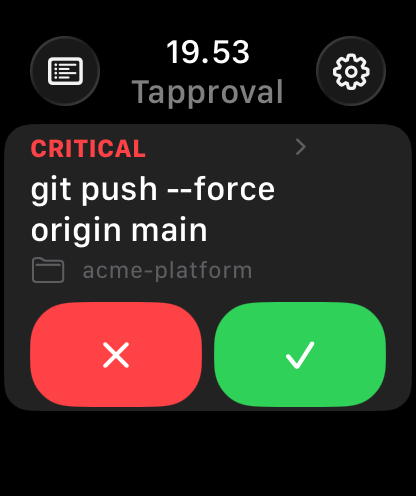
Every request is sorted into one of five risk tiers on your computer, and the card says which: a force-push to main arrives marked CRITICAL. Nothing is approved for you unless you ask it to be, and a CRITICAL never is.
Real questions, real options
Multiple-choice questions arrive with the same choices as on your desktop, several questions one after another. From watch app 2.0, pick more than one answer where Claude allows it.
Sessions, live
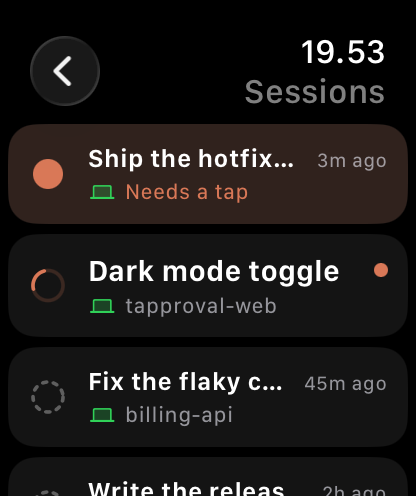
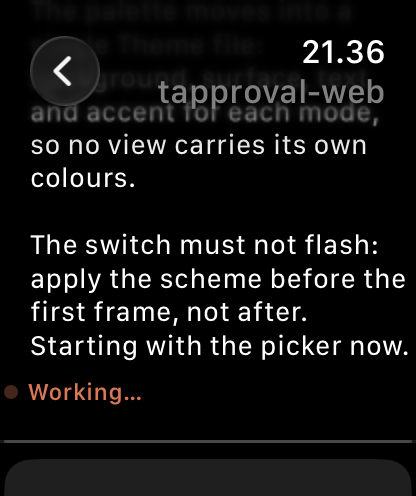
Start a session from the wrist, follow it, send it instructions. Sessions are grouped by what they need, and replies and plans read the way they do on your phone.
Your day
What was handled without you, what you decided, how much you used — and roughly how much time at the desk that saved.
The whole story
Since you installed: prompts handled, how few needed you, and every CRITICAL that was stopped for a human. No streaks, no badges, nothing to keep up.
Claude Code today
Any Mac or Linux machine running Claude Code. Other agents are on the roadmap.
Privacy
Tapproval collects nothing. There are no accounts, no analytics and no servers of ours. Prompts and conversations travel between your watch and your computer, directly or through an encrypted tunnel. The computer half is open source, so you can check.
Read the privacy policy · Read how it is secured · Read the bridge's source
Price
Every part of it, for your first 100 answers. Reading sessions and the day's overview stays free for good, and a prompt you don't answer from the wrist still appears on your computer. No account.
Unlimited answers, for good, on every watch on your Apple ID. No subscription, ever. An optional $1 coffee for the developer is there too.
Support
The five things people ask, answered here. For anything else there is one address, and a person reads it.
The watch can't find my computer
Two causes cover nearly every case. The watch and the computer must be on the same Wi-Fi, and a VPN on your iPhone must be fully connected or fully off: one that is half up hides your home network from the watch. Then open Settings on the watch and tap the status card at the top (it opens Connection). Every route gets a tick or a reason.
Pairing a watch
A first install pairs by itself. For a second watch, or after a reset, tell Claude Code on your computer:
Open Tapproval pairing
Then open Tapproval on the watch within ten minutes.
Updating
Nothing to do. The helper checks once a day and updates itself, never while a question is waiting on your wrist. If you installed it as a plugin, Claude Code looks after it; asking it to update Tapproval in plain words is enough.
Removing it
Tell Claude Code:
Uninstall Tapproval Base
It restores your settings, keeps a backup, stops the bridge and leaves nothing running. Delete the app from the watch like any other.
My phone still shows a question I answered
The command ran. The Claude app on a phone or iPad can keep displaying a prompt the watch has already answered. It is a known Claude Code bug, not the watch, and any message sent from the phone clears it.
Anything else
Questions, faults and suggestions alike. Say what Tapproval should do next.